DeepL’in “Faturalandırılan Karakterleri Göster” parametresiyle API kullanımına ilişkin ayrıntılı raporlar alın
Önemli Noktalar
- DeepL API kullanıcıları, her başarılı API isteği için faturalandırılan karakter sayısını raporlayabilir.
- show_billed_characters parametresi, kullanıcılara API yanıtında API kullanım verilerine doğrudan anında erişim sağlar.
- İstek başına kullanım verileri, API'dan doğrudan özel raporlama ve maliyet izleme iş akışlarında kullanılabilir.
- Bu, çevrilebilir karakterlerin tanımlanmasının daha zor olabileceği HTML veya XML gibi yapılandırılmış içerikler için özellikle kullanışlıdır.
- Bu özellik, DeepL API raporlamasını /usage uç noktasının ötesine genişletir ve çeviri faaliyetlerini daha yüksek hassasiyetle izlemenize yardımcı olur.
- Yeni show_billed_characters parametresi, ek bir kurulum gerektirmeden tüm DeepL API müşterileri tarafından kullanılabilir.
DeepL API her zaman raporlama ve analizi, sizin gibi geliştiriciler ve işletmeler için bir öncelik olarak görmüştür. Bu, ister API'nin kendisindeki /usage uç noktası aracılığıyla ister çoklu API key için raporlama işlevselliği aracılığıyla olsun, geçerlidir.
Ekibimiz, giderek büyüyen raporlama araçları listemize bu kullanışlı özelliği ekledi: show_billed_characters artık tüm API müşterileri tarafından kullanılabilir.
Bu, DeepL API'sinin büyüyen raporlama işlevselliğine bir katkı sağlar. Artık her API isteği için yanıt verilerinde kaç karakterin faturalandırıldığına dair ayrıntılı bir görünüm sunuyor.
show_billed_characters parametresi nedir?
Daha önce, DeepL API'sinden doğrudan doğru kullanım verilerini almak isteyen API kullanıcılarının /usage uç noktasını çağırmak için tek bir seçeneği vardı. Bu, mevcut fatura dönemi için en güncel karakter kullanımını almanın etkili bir yoludur. Ancak, her istekte çevrilen karakterlerin doğru bir dökümünü vermez.
İsteğe bağlı bir parametre, her başarılı API isteğinin yanıtıyla birlikte çevrilen ve faturalandırılan karakter sayısını döndürerek bu sorunu çözer.
DeepL API kullanıcıları için esnek anahtar düzeyinde raporlamayı keşfedin.
show_billed_characters parametresi nasıl çalışır?
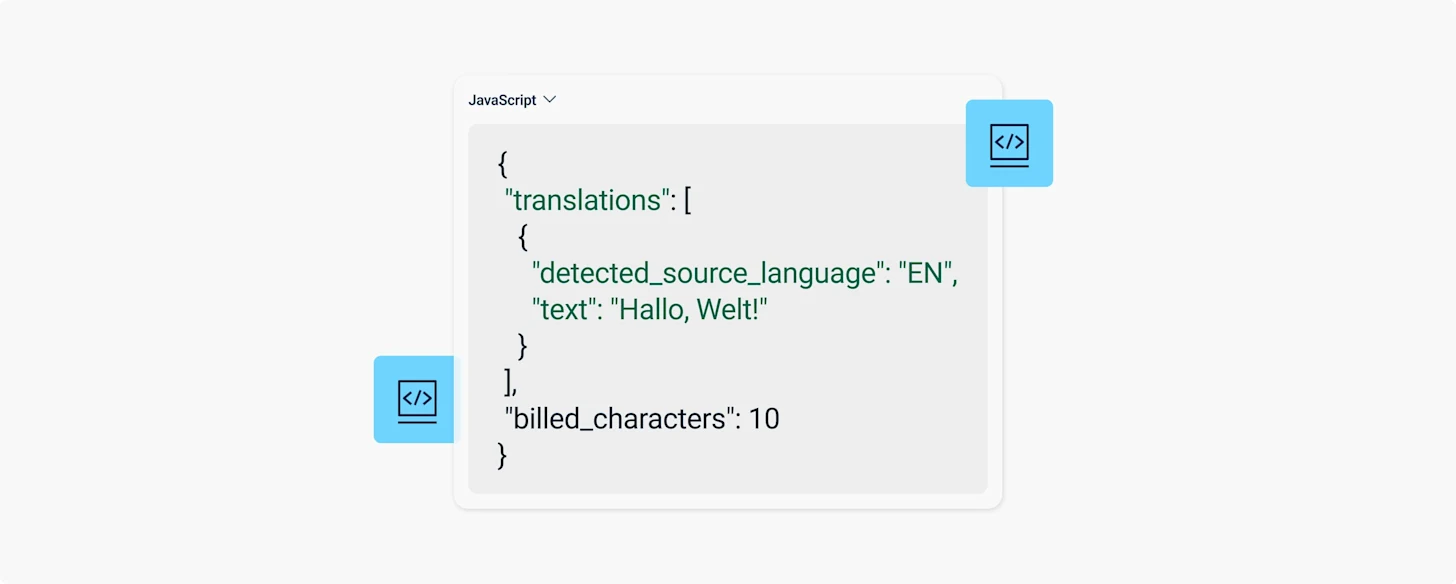
cURL komutu gibi yöntemlerle API'ye doğrudan istek gönderen API müşterileri, isteklerine yeni show_billed_characters parametresini ekleyebilir. Bu, yanıt verilerinin bir parçası olarak faturalandırılan karakter sayısını döndürür.
Karakter maliyeti içeren API yanıtları, her yanıtta "billed_characters:50" biçiminde yeni bir tamsayı değeri döndürür.
Bu değeri, raporlama iş akışlarında kullanmak ve her bir bireysel API isteğinin maliyetini takip etmek için API tüketicisi tarafında takip edebilirsiniz.
Bu, çevrilebilir karakterleri belirlemenin zor olabileceği HTML veya XML gibi yapılandırılmış içerik içeren istekler için özellikle önemlidir.
Gelecekte, DeepL ekibi varsayılan olarak DeepL API yanıtına billed_characters'ı dahil etmeyi planlamaktadır. O noktada, API yanıtına "billed_characters" değerini dahil etmemek için show_billed_characters değerini "false" olarak ayarlamak gerekecektir.
DeepL'in çoklu API key ile güvenliği nasıl güçlendirdiğini öğrenin.
show_billed_characters ile API yanıtı nasıl görünür
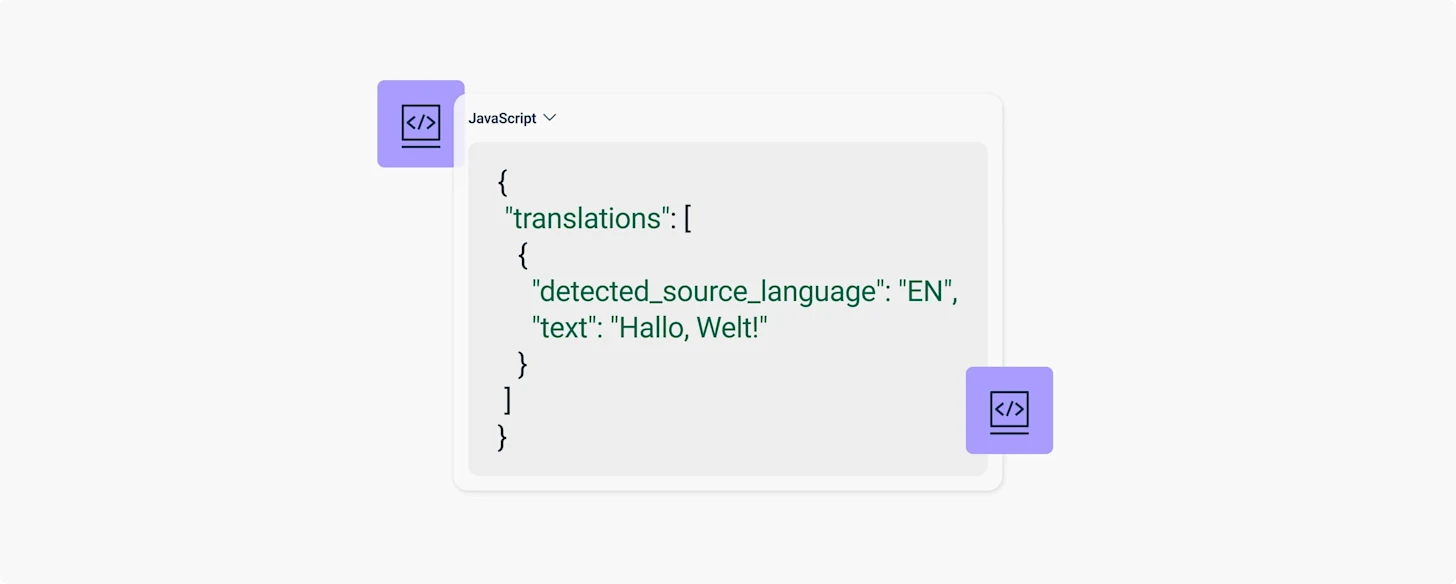
Şu anda, API'ye bir istek gönderdiğinizde buna benzer bir yanıt alırsınız:
Yeni show_billed_characters parametresini kullanarak bir istek gönderirseniz, yanıtınız şöyle görünecektir:
Küresel şirketlerin şimdi yararlanması gereken altı çeviri dönüşümünü görün.
DeepL neden istek başına faturalandırılan karakter raporlamasını ekledi?
Birçok müşteri bu aracı talep etmiştir. Bu araç, karakter faturalandırmasını ayrıntılı bir şekilde raporlamanıza ve her başarılı API çeviri isteğinde bu verileri kendi raporlama araçlarınıza doğrudan entegre etmenize olanak tanır.
show_billed_characters parametresi, DeepL kullanıcıları için API içinde tamamen işlevseldir; ek bir kurulum gerekmez.
Ayrıca, bu değişikliği yansıtmak için API dokümantasyonumuzu güncelledik; böylece sizin gibi geliştiricilerin bunu iş akışlarına entegre etmeleri ve daha yüksek çeviri doğruluğundan yararlanmaya başlamaları kolaylaştı.
Daha fazla bilgi için İstek Gövdesi Açıklamaları ve Sürüm Notları bölümlerini okuyun.
DeepL API ile daha akıllı raporlama oluşturun
DeepL API, yüksek kaliteli çevirileri doğrudan kendi araçlarınıza entegre etmeniz için esnek bir yol sunar. show_billed_characters gibi özellikler sayesinde, bu çeviri gücünü daha kesin kullanım raporlaması ve maliyet görünürlüğü ile birleştirebilirsiniz.
Bu, Translator, Write ve Voice uygulamalarını destekleyen aynı dil yapay zekası paketi'nin bir parçasıdır; böylece çeviri ihtiyaçlarınız arttıkça, altta yatan altyapı da sizinle birlikte ölçeklenir.
DeepL API'yi keşfedin veya Satış ekibiyle iletişime geçin kurumsal raporlama ve entegrasyon ihtiyaçlarınızı görüşmek için.